
AI reporting & performance alerts
Know what needs attention before your next reporting meeting.
Get one weekly email explaining what changed and daily checks for the changes that deserve attention. Built for owners and teams reviewing sales, operations, financial performance, or marketing.
Relevant experience includes AI reporting for L&F’s American Restoration account.
A brief you can use
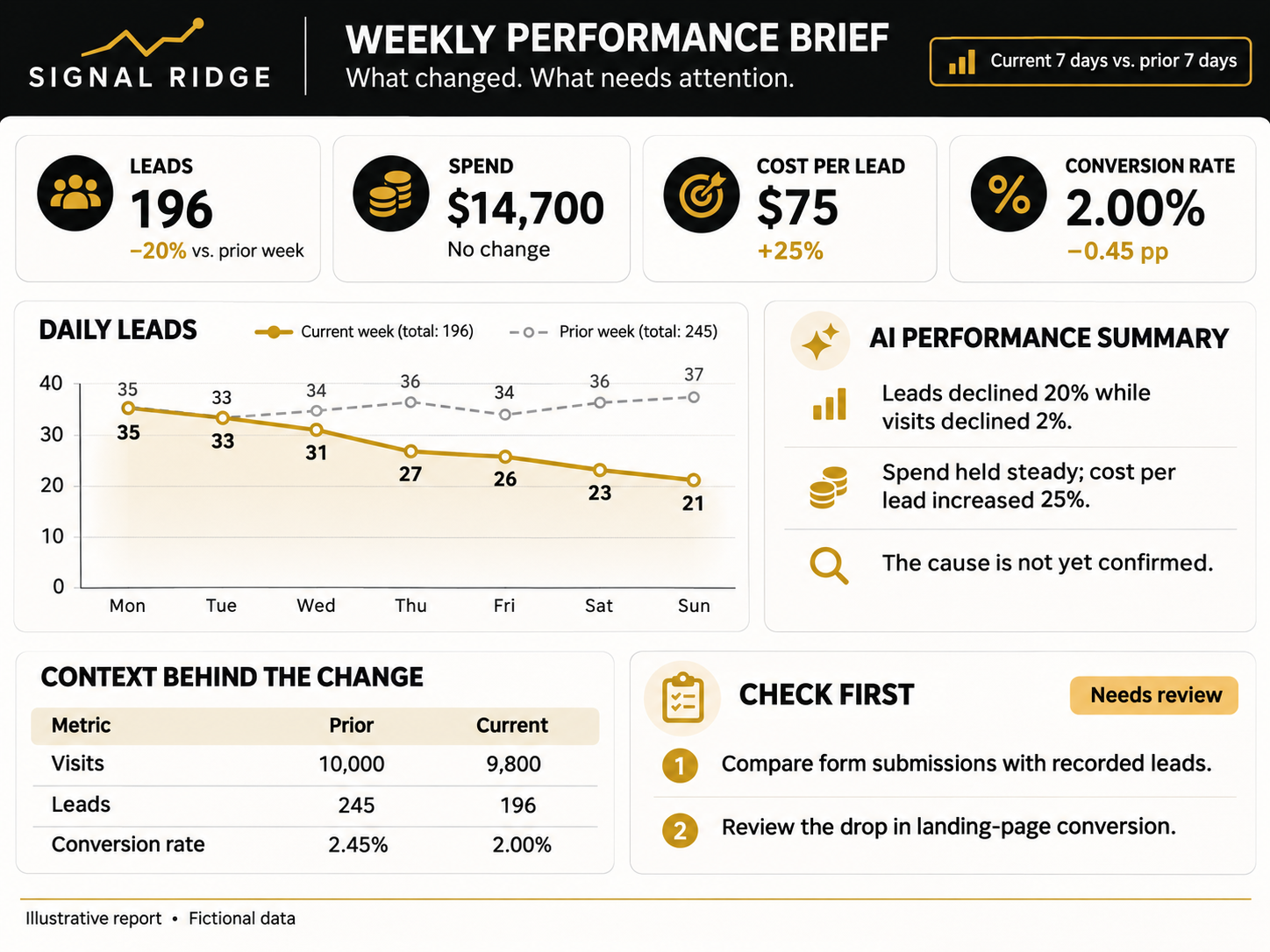
The important movements, supporting numbers, and next checks in one email.
Alerts with context
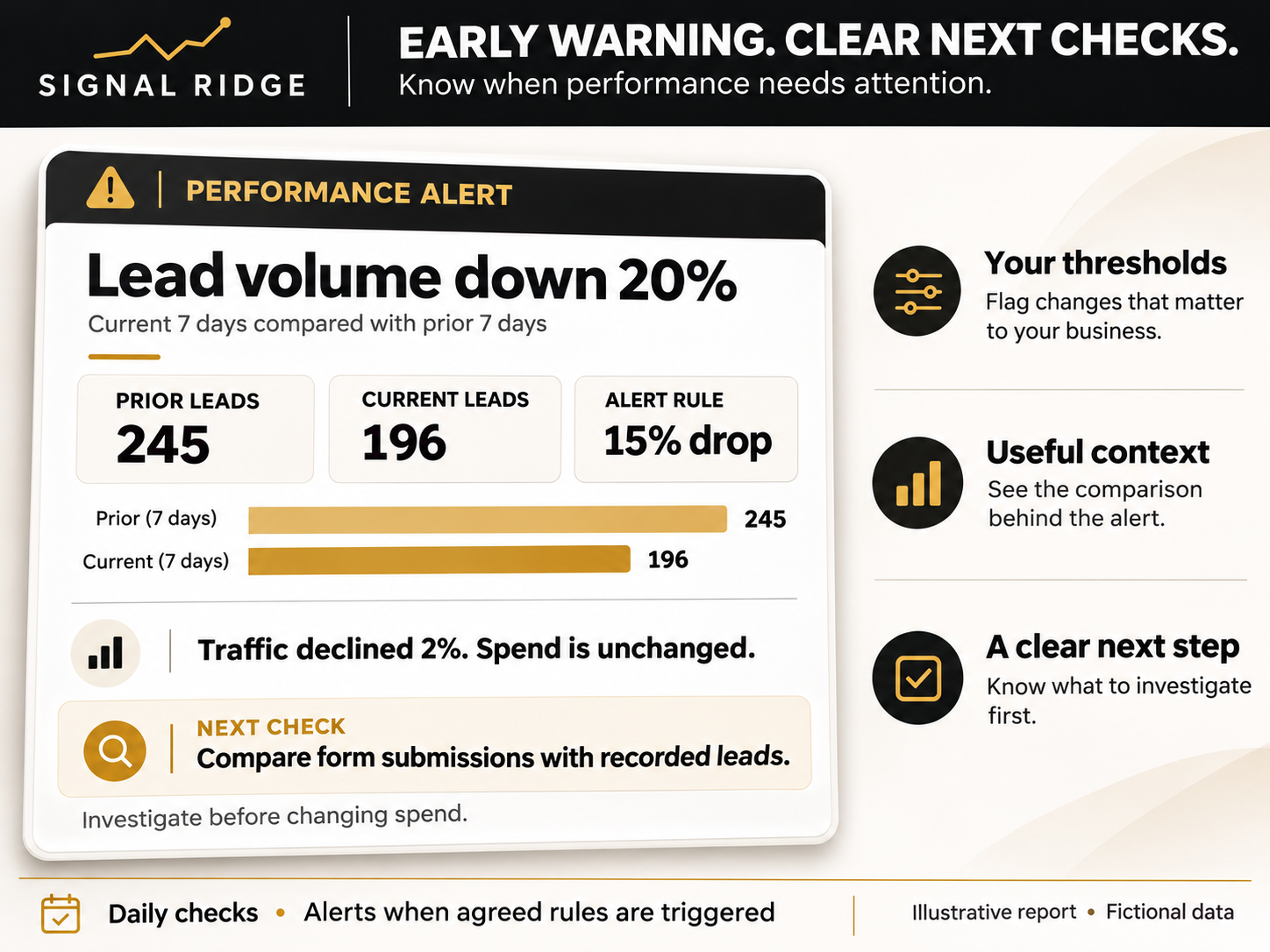
Know what changed, compared with what, and why it deserves a closer look.
Your definition of success
KPIs and thresholds agreed with the people who use the reports.
Less recurring assembly
Scheduled reporting that runs from the data you already maintain.
When reporting arrives too late
Last week’s problem shouldn’t be a surprise in this month’s report.
Leads fall. Jobs take longer to complete. Margin slips. If someone has to download and assemble the numbers before you can see the change, the investigation starts late.
We build a workflow that checks the agreed metrics daily and puts the weekly story in your inbox. Each alert includes enough context to make the next conversation useful.
What changed? Compared with what? What should we check next?
See what arrives in your inbox
A weekly brief. A clear warning when something needs attention.
The examples below use fictional marketing data. The same structure can be built around the financial, sales, or operational metrics in your prepared dataset.
Your weekly performance brief
An alert your team can act on
What we build
A reporting workflow designed around your business.
Agree on the numbers that matter
We select 3–5 primary KPIs and the supporting metrics that help explain changes, up to 10 metrics total. Definitions, comparisons, and targets are documented.
Make the weekly report automatic
One scheduled email brief brings together the KPI scorecard, AI commentary, and recommended checks for one consolidated business view.
Define useful alert rules
We use real examples of what should and shouldn’t trigger an alert. Daily checks evaluate up to three agreed rules, with handling for missing data and repeated notifications.
Test it and hand it over
We check calculations against your source and test a true alert, a normal variation, missing data, and repeat notifications. Delivery, documentation, two revision rounds, and one handoff session are included.
The reporting foundation matters
Reliable numbers first. AI interpretation second.
We calculate and validate the KPIs before AI interprets them. Reports distinguish observed changes from possible explanations and suggested checks. Missing data is flagged.
Relevant AI reporting work includes L&F’s American Restoration account. Broader experience spans agency, multi-brand, operational, and financial reporting. The sample images illustrate the format with fictional data; they do not claim client results.
Signal Ridge reporting experience
Client accounts supported by an agency reporting system
Brands included in a multi-brand reporting design
A clearly scoped first implementation
AI Reporting & Alerts
One useful reporting workflow, built on a prepared data source.
- One consolidated business view
- One regularly refreshed Google Sheet or BigQuery reporting table
- Up to 10 metrics and 3 alert rules
- One weekly email report and daily alert checks
- Validation, documentation, two revision rounds, and one handoff session
21 calendar days from receiving the agreed requirements and access. Software, hosting, and AI usage costs are separate and confirmed before activation.
Is this the right starting point?
A good fit when…
- Your reporting data already refreshes reliably.
- You still spend time interpreting, assembling, or distributing recurring reports.
- Your team can agree on the business view and what deserves attention.
- You want a working system your team can own.
How we check the finished workflow
- Reconcile agreed metrics with source totals.
- Test alert and no-alert examples, missing data, and repeated warnings.
- Verify the weekly email, daily schedule, and handover instructions.
If the data needs work first
We can assess what’s missing before you commit. New integrations, substantial cleanup, tracking repairs, and dashboard builds need their own scope.
Start with one view. Expand when useful.
Separate location, brand, or client-account reports, additional data sources, and ongoing monitoring or maintenance can be scoped after the first workflow is in place.
Choose the business view that matters
The same reporting discipline. Different decisions.
We select one consolidated view for the first implementation. These are examples, not additional reports bundled into the package.
Sales and marketing
Qualified leads fall below the agreed range. Check source mix, contact volume, and qualification rate before deciding where to act.
Operations
Completed jobs fall while the backlog grows. Check work volume and cycle time to focus the next operational review.
Financial performance
Gross margin moves outside the agreed band. Review revenue mix and direct costs in your prepared reporting data.
Useful context, every time
Show the comparison period, supporting metrics, and next checks. Separate an observed change from an explanation that still needs investigation.
Buy without booking a call
A quick check before you start.
Confirm these three points to continue with AI Reporting & Alerts.
21 calendar days after complete requirements and access. Two revision rounds. Third-party software and usage costs are separate.
Prefer to talk first? Book a call →Before we start
A few practical questions.
Is this only for marketing teams or agencies?
No. It can support business owners and teams reviewing sales, operations, financial performance, or marketing. The starting package covers one consolidated business view using one prepared, regularly refreshed dataset.
What data do we need?
One existing Google Sheet or BigQuery reporting table with the agreed metrics and enough history for the comparisons you need. The process that updates that data must already work. If you’re unsure, bring your current report to the call and we’ll assess it.
Are the alerts real-time?
The workflow checks daily and emails alerts when an agreed rule is triggered. Detection depends on your source data being refreshed. The package does not include continuous real-time monitoring.
How do you keep the AI from making up the numbers?
Metric calculations happen before AI interpretation and are checked against the source. The report separates observations from possible explanations and suggested investigations. Missing data is flagged, and AI commentary is tested during setup. Your team remains responsible for business decisions.
What if we haven’t decided on our KPIs or thresholds?
We work through those together. We select 3–5 primary KPIs, supporting metrics within the 10-metric total, and up to three alert rules. Real examples help us define useful warnings and normal variation.
Who owns the system, and what happens after handoff?
The workflow runs through your accounts. You receive setup documentation and one handoff session. Software, hosting, and AI usage costs are separate from the build fee. Ongoing monitoring, maintenance, and changes can be scoped if you want continued support.
Choose your next step
Start with one reporting workflow.
If your data is ready, confirm the package requirements and buy online. If you need help choosing the first business view, book a call and bring your current report.
A call is optional for projects that meet the package requirements.