Meeting after meeting, and no time to actually get work done?
It’s frustrating to give up half an hour, work through a discussion, and leave wondering what you accomplished—or why you needed to be there.
I think about meetings in three phases: what happens before, how we use the time together, and what happens afterward. Each gives us a chance to make better use of everyone’s time. Sometimes the best improvement is deciding we don’t need the meeting.
The goal is to leave knowing what we decided, what happens next, and who’s doing it—and only bring together the people needed to get there.
Jump to: Before the meeting · During the meeting · Follow-through
Before you invite everyone, figure out what you need
What would make this meeting worth the time? If you can’t answer that, keep working on the purpose before putting it on everyone’s calendar.
“Review the numbers” doesn’t give people much to prepare for. “Decide what we’re going to do about declining profit margins” does. You know what the conversation needs to accomplish and can think through what information and people will help.
That’s what an agenda should do. Send it ahead of time with the information people need to review, and ask for input where it helps. Give them a chance to come ready to contribute instead of spending the meeting catching up.
Be honest about who needs to be there. Someone who can explain the problem or make a decision has a reason to attend. Someone who just needs to know what was decided can get the notes afterward. And if all you need to do is share an update, an email or short recording may do the job.
During the meeting, deal with what’s getting in the way
In my weekly meetings with the New York City Department of Environmental Protection, we spent so much time scrutinizing actual performance that we struggled to get anything productive out of the discussion.
It felt like everyone had a part of the overall picture. The site engineer had the data. The operations and maintenance team knew what was happening at the facility. I was trying to piece it together.
I created a scorecard showing actual performance against agreed-upon targets, with upper and lower operating bands. It fit on one sheet, printed front and back. Everyone got a copy at the beginning of the meeting.
That gave us one source of truth. We could agree on how we were doing quickly and move into what to do about it. We were then able to continually identify and prioritize ideas to improve performance, looking for the ones that were easiest to implement and would have the highest impact.
In those meetings, agreeing on performance was what kept us from making progress. In yours, it might be a discussion that keeps drifting away from the goal, one person doing all the talking, or the people closest to the problem never being asked what they think.
Come back to what you’re there to accomplish. Give people room to challenge an idea, explain what they’re seeing, or say they don’t know. If the conversation goes somewhere else, decide whether that helps you reach the goal or needs its own discussion.
The $$ jar: make your meeting expectations stick
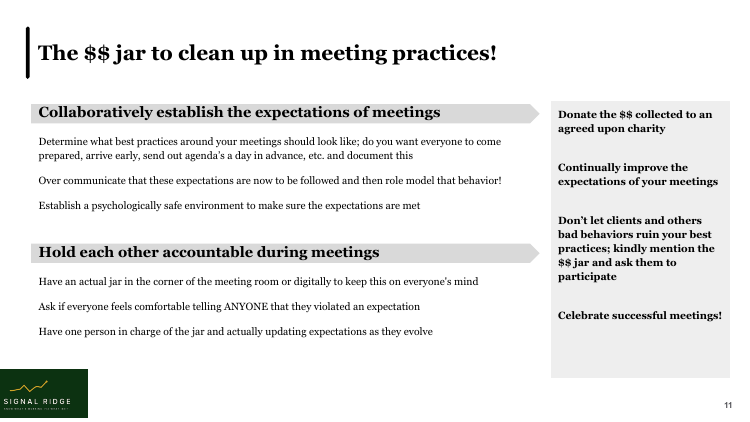
One idea from my original Effective Meeting Secrets guide was a $$ jar to clean up meeting practices.
The team agrees on how they want meetings to work—coming prepared, sending agendas ahead of time, or giving people a chance to finish speaking. Put those expectations in writing. Then use an actual jar, or a digital version, as a reminder: when someone breaks an agreed expectation, they contribute to the jar. Donate the money to a charity the group chooses.
The agreement matters here. People need to be comfortable calling out anyone, including the person leading the meeting. Get everyone’s buy-in, model the behavior yourself, and keep it good-natured. A jar won’t help if people are afraid to speak up.
Keep improving the expectations as you learn what works. The jar gives you a way to bring those conversations into the room instead of letting the same frustrations continue every week.
Don’t leave the next step up to interpretation
Ever leave a great meeting uncertain of who is doing what?
Before everyone leaves, say what was decided and confirm what happens next, who owns it, and by when. Make it awkward if you need to, and never skip this part. A useful discussion can go nowhere if everyone leaves assuming someone else will handle it.
“I’ll look into it” needs a little more work. What are you looking into? What will you bring back, and when? Leave enough time to agree on that before the meeting ends.
This is where tools like Fathom can help. A recording, transcript, and AI summary mean you have something to return to and a starting point for the follow-up. Agree on recording with the group, check the notes, and make sure the actions reflect what people actually committed to.
Send the relevant decisions and next steps to the people who only needed to be informed. Give them a recording or excerpt when context would help; they shouldn’t have to sit through the whole thing to find their update.
Then follow up. Did the work happen? Did it help? What needs to change? Bring that back into the next conversation so you’re building on what you decided.
Start with the meeting you already wish was better
You don’t have to overhaul every meeting at once. Pick one recurring meeting and ask the people in it what’s wasting their time. Fix that part, then ask whether the change helped.
Maybe you need better preparation, fewer people in the room, or a clearer ending. In NYC, we needed a shared view of performance so we could get on with improving it.
That’s where this connects to my work at Signal Ridge. I help teams get information they can trust and use. The meeting is where that information meets the experience of the people doing the work—and where you decide what happens next.
If your team keeps getting stuck trying to agree on the numbers, bring me the report you’re using and the question you’re trying to answer.